Autodesk stopped selling and supporting Eagle on 7 June 2026. Eagle Free went with it, and the newer versions sign in to a licence server that Autodesk said it would shut down. If you drew boards in Eagle, you have a folder of .brd files and, maybe, no program left that opens them.
The files are fine. Since Eagle 6 they have been plain XML, and three kinds of tool still read them.
Can you still open Eagle files?
Yes. A .brd saved by Eagle 6 or later opens in Autodesk Fusion, in KiCad and in Protoboard Designer, which also runs on a phone or a tablet. A board saved by Eagle 5 or older is binary and needs converting first.
| Tool | What it opens | Runs on |
|---|---|---|
| Autodesk Fusion | Eagle designs and libraries, schematic and board. Autodesk's own way forward for Eagle users. | Windows and Mac. A subscription, or a free licence for personal use with limits. |
| KiCad | The .sch and the .brd together, as one KiCad project: File → Import Non-KiCad Project. Eagle 6 or later; the two files need the same name. | Windows, Mac and Linux. Free and open source. |
| Protoboard Designer | The .brd as an editable board. The board only, not the schematic. | iPhone, iPad, Android and the browser. Free on every plan. |
Which one depends on what you want from the old board. If the design will keep growing and you want its schematic and netlist, go to KiCad or Fusion. If you want to change the board and make it again (move a connector, widen a track, order five more or etch one tonight), Protoboard Designer opens it on whatever screen is in front of you.
How to open a .brd in Protoboard Designer
- Get the
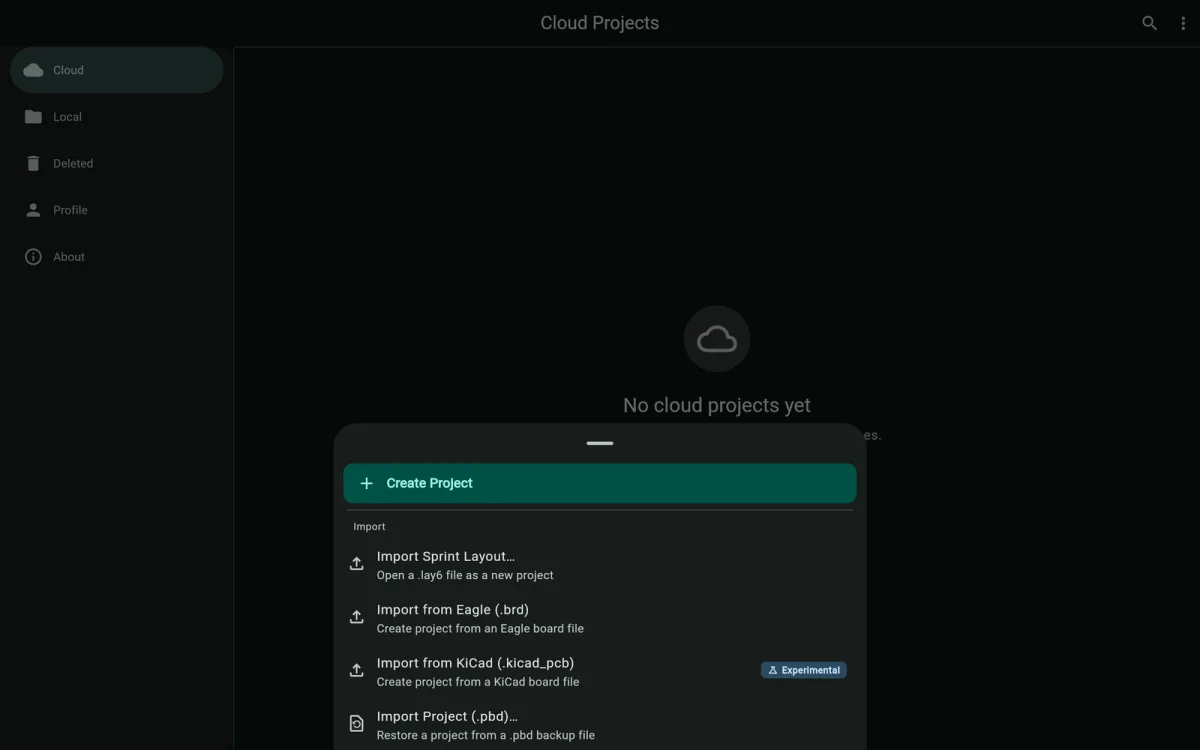
.brdonto the device: from cloud storage, an email attachment, or a USB stick on a tablet. - In the project list, open the create project menu and choose Import from Eagle (.brd).
- Pick the file. The board opens as a new project, where every pad, track and outline is yours to edit.
- If something couldn't come across exactly, an Imported with caveats screen says what and why. Read it.
What comes across
The pads (with their holes, shapes and rotations), tracks, vias, the silkscreen, the board outline and the parts come across where Eagle had them, on both sides of the board. The board comes in at the right scale, and parts on the bottom are turned the right way.
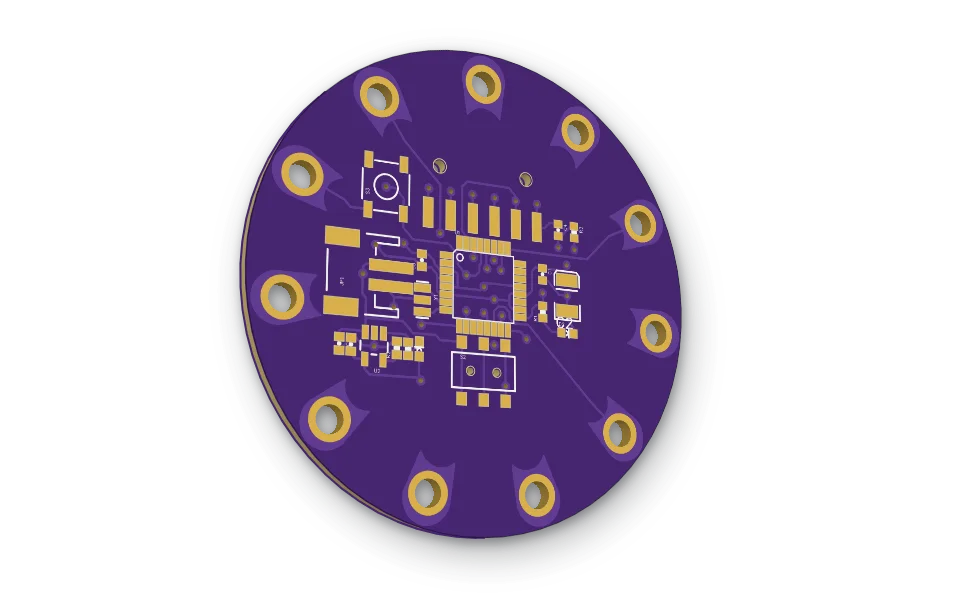
Eagle's copper pours are left out. In their place, AutoGround fills the net that had the board's largest pour, usually ground. After that the board behaves like one you drew here: the design rule check, the 3D view and every export work on it.
What doesn't come across
- The schematic and its nets. What imports is the copper, so the board has no airwires telling you what still needs routing. The Net Probe follows the imported copper, so you can still see what a net touches.
- Inner layers. Protoboard Designer is a two-layer editor, so a four-layer board comes in as its outer layers, and the import says how many objects it skipped.
- A way back. There's no export to
.brd. A board you keep editing here leaves as Gerber files for a fab, PDFs and images to make it at home, or a parts list.
Your Eagle libraries are a separate import: the Maker plan imports footprints from Eagle .lbr files, as well as from KiCad and Sprint-Layout.
A board from Eagle 5 or older
Eagle switched to XML in 2011, with version 6. Boards saved before that are binary, and neither Protoboard Designer nor the current KiCad reads them (KiCad's importer turns them away too).
To tell which you have, open the .brd in a text editor. An XML board starts with <?xml and has an <eagle version="…"> line near the top. A binary one is unreadable from the first byte.
A binary board can still be rescued:
- A copy of Eagle 6 or later, if one still runs on an old computer, opens the old format and saves it as XML. Save a copy, then import that.
- pcb-rnd, a free open-source PCB editor, reads Eagle 3, 4 and 5 boards and can save them in KiCad's format, which Protoboard Designer opens. We haven't tested that route ourselves; check the result in the 3D view.
Before you make an imported board
- Read the caveats screen and look at whatever it names.
- Run the design rule check, with the Fab profile of the fab you'll order from. A board drawn to one fab's rules years ago may not meet the minimums of the fab you order from today.
- Open the 3D view and turn the board over. It's drawn from the same data as the Gerber files, so a pad the mask covers or a missing outline is easy to spot. More in See your PCB in 3D before you order it.
- Make it either way: order it from a fab with Gerber files (Engineer plan), or make it at home from a PDF to etch (free on every plan).
Boards from KiCad and Sprint-Layout open the same way: Open KiCad, Eagle and Sprint-Layout boards on your phone. The step-by-step guide for Eagle is in the docs: Import from Eagle.
Frequently asked questions
Can I still use Eagle after June 2026?
Not as before. Autodesk stopped selling and supporting Eagle on 7 June 2026, Eagle Free is no longer available, and newer versions sign in to a licence server Autodesk said it would shut down. Your files still open elsewhere: in Autodesk Fusion, in KiCad and in Protoboard Designer.
Can I open an Eagle .brd file on my phone?
Yes. Protoboard Designer opens Eagle .brd boards saved by Eagle 6 or later as editable projects on Android, iPhone, iPad and in the browser, free on every plan.
Does the schematic come across?
Not into Protoboard Designer, which imports the board only. KiCad and Fusion import the schematic together with the board.
What do I do with a .brd from Eagle 5 or older?
It is a binary file that current importers do not read. Open it in a copy of Eagle 6 or later, which reads the old format and saves XML, or in pcb-rnd, a free PCB editor that reads Eagle 3, 4 and 5 boards.
Why won't my Eagle file import?
Check that it is a board file (.brd), not a schematic (.sch) or a library (.lbr), and that it is XML: open it in a text editor and look for an <eagle version="…"> line near the top.
Open an old Eagle board tonight
Free on every plan, on your phone, your tablet or in the browser.
Open the Web App